

The MalwareTips app
Your community, one tap away.
Open MalwareTips from your Home Screen or desktop. Follow discussions, find answers and pick up where you left off.
- Home Screen access
- Optional push alerts
- Your community
You're ready to explore.Explore what's new
Installation instructions
iPhone & iPad
- Open MalwareTips in Safari and tap Share. You may need to open the Page Menu first.
- Choose Add to Home Screen. If it is not listed, use Edit Actions to add it.
- Keep Open as Web App enabled if shown, then tap Add.
Android
- Open MalwareTips in Chrome or another browser that supports app installation.
- Open the browser menu and look for Install app, Install and create shortcut, or Add to Home screen.
- Choose Install and confirm. Wording varies by browser.
Desktop
- Chrome: use the install icon in the address bar, or the menu under Cast, save and share.
- Edge: open the menu, then More tools, Apps and Install this site as an app.
- Safari on Mac: choose Share or File, then Add to Dock. Firefox on Windows: look for the web apps button in the address bar.
If you cannot find an install option, update your browser or use its bookmark option to keep MalwareTips close.
Keep up with your conversations
After installation, open the app and sign in. Enable push notifications in Preferences if you want alerts. On iPhone and iPad, push requires a Home Screen web app and iOS or iPadOS 16.4 or later.
Sign in to manage notificationsInstallation is optional. Your notification settings stay under your control.
You are using an out of date browser. It may not display this or other websites correctly.
You should upgrade or use an alternative browser.
You should upgrade or use an alternative browser.
Troubleshooting Windows 10 pro with intel i5 10gen takes like 1 min to shutdown
-
 Thread starter
peter1111
Thread starter
peter1111
- Start date
- 51 Replies
- 13,415 Views
Solution

guys lol he said it felt faster after uninstalled BT. no need to reinstall Windows OS..

I would recommend having a look at this article and consider turning off Fast startup
and see if you notice a difference in shutdown times.
 www.windowscentral.com
and see if you notice a difference in shutdown times.
How to disable and enable fast startup on Windows 10
If Windows 10 fast startup is not something you want to be enabled, you can disable it with relative ease.
www.windowscentral.com
Upvote
0

I disabled fast start up but it still doesn't seem any fast tho.I would recommend having a look at this article and consider turning off Fast startup
and see if you notice a difference in shutdown times.
How to disable and enable fast startup on Windows 10
If Windows 10 fast startup is not something you want to be enabled, you can disable it with relative ease.
Upvote
0

Gandalf_The_Grey
Level 86
Verified
Honorary Member
Top Poster
Content Creator
Well-known
Forum Veteran
Disabling hibernation if you don't use it probably solves your shutdown time issue.

How to disable and re-enable hibernation - Windows Client
Explains how to turn off the hibernation feature in Windows.
docs.microsoft.com
Upvote
0
what system specs? Here is a few genral ones
Overall | |
| General | |
| Operating System | Microsoft Windows 10 Pro |
| Central Processor | Intel(R) Core(TM) i5-1035G1 CPU @ 1.00GHz |
| User Name | peter |
| Graphics | |
| Video Adapter | Intel(R) UHD Graphics |
| Video Memory | 1.0 GB |
| Screen Resolution | 1920 x 1080 |
| Storage | |
| Total Memory | 7.8 GB |
| Free Memory | 2.5 GB |
| Total Hard disk | 1049.7 GB |
| Free Hard disk | 925.4 GB |
| I/O | |
| Mouse | Synaptics PrecisionTouchpad Filter Driver |
| Keyboard | HID Keyboard Device |
Top
Operating System | |
| Computer System | |
| Computer Name | Envy-17 |
| User Name | Peter |
| Organization | N/A |
| Operating System | |
| OS Name | Microsoft Windows 10 Pro |
| OS Version | 10.0.19042 |
| Product ID | |
| System Up Time | 2021-04-22 8:37:31 AM |
| Internet Explorer Version | 11.789.19041.0 |
| Microsoft DirectX Version | DirectX 12 |
| OpenGL Version | 10.0.19041.928 (WinBuild.160101.0800) |
| Registry | |
| Maximum Size | 4095 MB |
| Current Size | 174 MB |
| Status | OK |
Top
Processor & Motherboard | |
| Central Processor | |
| CPU Name | Intel(R) Core(TM) i5-1035G1 CPU @ 1.00GHz |
| Number of logical processors | 8 |
| Code Name | N/A |
| Manufacturer | GenuineIntel |
| Current Clock Speed | 991 Mhz |
| Max Clock Speed | 1190 Mhz |
| Voltage | 0.6V |
| External Clock | 100 Mhz |
| Serial Number | BFEBFBFF000706E5 |
| CPU ID | Intel64 Family 6 Model 126 Stepping 5 |
| Socket Designation | U3E1 |
| L1 Cache | 192 KB |
| L1 Cache | 128 KB |
| L2 Cache | 2048 KB |
| L3 Cache | 6144 KB |
| Motherboard | |
| Model | 875C |
| Manufacturer | HP |
| Serial Number | PJUAEK21WDTE0J |
| BIOS Name | F12 |
| BIOS Vendor | Insyde |
| SMBIOS Version | F12 |
| BIOS Date | 2020-11-10 |
| BIOS Features | |
| PCI is supported | Yes |
| BIOS is Upgradable (Flash) | Yes |
| BIOS shadowing is allowed | Yes |
| Boot from CD is supported | Yes |
| Selectable Boot is supported | Yes |
| EDD (Enhanced Disk Drive) Specification is supported | Yes |
| Int 13h - Japanese Floppy for NEC 9800 1.2mb (3.5, 1k Bytes/Sector, 360 RPM) is supported | Yes |
| Int 13h - Japanese Floppy for Toshiba 1.2mb (3.5, 360 RPM) is supported | Yes |
| Int 13h - 5.25 / 360 KB Floppy Services are supported | Yes |
| Int 13h - 5.25 /1.2MB Floppy Services are supported | Yes |
| Int 13h - 3.5 / 720 KB Floppy Services are supported | Yes |
| Int 13h - 3.5 / 2.88 MB Floppy Services are supported | Yes |
| Int 9h, 8042 Keyboard services are supported | Yes |
| Int 10h, CGA/Mono Video Services are supported | Yes |
| ACPI supported | Yes |
| USB Legacy is supported | Yes |
Top
Memory Device | |
| Memory Resource | |
| Total Memory | 7.8 GB |
| Used Memory | 5.3 GB |
| Free Memory | 2.5 GB |
| Memory Usage | 67% |
| Physical Memory | |
| Memory Bank | BANK 0 |
| Description | Physical Memory 0 |
| Device Locator | Bottom - Slot 1 (left) |
| Capacity | 4.0 GB |
| Speed | 3200 Mhz |
| Manufacturer | Micron |
| Data Width | 64 bit |
| Memory Type | Unknown |
| Form Factor | SODIMM |
| Physical Memory | |
| Memory Bank | BANK 2 |
| Description | Physical Memory 1 |
| Device Locator | Bottom - Slot 2 (right) |
| Capacity | 4.0 GB |
| Speed | 3200 Mhz |
| Manufacturer | Micron |
| Data Width | 64 bit |
| Memory Type | Unknown |
| Form Factor | SODIMM |
Last edited:
Upvote
0
Has tuned it offDisabling hibernation if you don't use it probably solves your shutdown time issue.
How to disable and re-enable hibernation - Windows Client
Explains how to turn off the hibernation feature in Windows.docs.microsoft.com
Upvote
0

what system specs? Here is a few genral ones
Please hide sensitive information like Windows product ID.
Which AV do you have? In the latest Windows releases I noticed any 3rd party AV causes boot up and shutdown times to increase compared with Defender
Upvote
0

what system specs? Here is a few genral ones
General Operating System Microsoft Windows 10 Pro Central Processor Intel(R) Core(TM) i5-1035G1 CPU @ 1.00GHz User Name peter Graphics Video Adapter Intel(R) UHD Graphics Video Memory 1.0 GB Screen Resolution 1920 x 1080 Storage Total Memory 7.8 GB Free Memory 2.5 GB Total Hard disk 1049.7 GB Free Hard disk 925.4 GB I/O Mouse Synaptics PrecisionTouchpad Filter Driver Keyboard HID Keyboard Device
Top
Computer System Computer Name Envy-17 User Name Peter Organization N/A Operating System OS Name Microsoft Windows 10 Pro OS Version 10.0.19042 Product ID 00330-80000-00000-AA651 System Up Time 2021-04-22 8:37:31 AM Internet Explorer Version 11.789.19041.0 Microsoft DirectX Version DirectX 12 OpenGL Version 10.0.19041.928 (WinBuild.160101.0800) Registry Maximum Size 4095 MB Current Size 174 MB Status OK
Top
Central Processor CPU Name Intel(R) Core(TM) i5-1035G1 CPU @ 1.00GHz Number of logical processors 8 Code Name N/A Manufacturer GenuineIntel Current Clock Speed 991 Mhz Max Clock Speed 1190 Mhz Voltage 0.6V External Clock 100 Mhz Serial Number BFEBFBFF000706E5 CPU ID Intel64 Family 6 Model 126 Stepping 5 Socket Designation U3E1 L1 Cache 192 KB L1 Cache 128 KB L2 Cache 2048 KB L3 Cache 6144 KB Motherboard Model 875C Manufacturer HP Serial Number PJUAEK21WDTE0J BIOS Name F12 BIOS Vendor Insyde SMBIOS Version F12 BIOS Date 2020-11-10 BIOS Features PCI is supported Yes BIOS is Upgradable (Flash) Yes BIOS shadowing is allowed Yes Boot from CD is supported Yes Selectable Boot is supported Yes EDD (Enhanced Disk Drive) Specification is supported Yes Int 13h - Japanese Floppy for NEC 9800 1.2mb (3.5, 1k Bytes/Sector, 360 RPM) is supported Yes Int 13h - Japanese Floppy for Toshiba 1.2mb (3.5, 360 RPM) is supported Yes Int 13h - 5.25 / 360 KB Floppy Services are supported Yes Int 13h - 5.25 /1.2MB Floppy Services are supported Yes Int 13h - 3.5 / 720 KB Floppy Services are supported Yes Int 13h - 3.5 / 2.88 MB Floppy Services are supported Yes Int 9h, 8042 Keyboard services are supported Yes Int 10h, CGA/Mono Video Services are supported Yes ACPI supported Yes USB Legacy is supported Yes
Top
Memory Resource Total Memory 7.8 GB Used Memory 5.3 GB Free Memory 2.5 GB Memory Usage 67% Physical Memory Memory Bank BANK 0 Description Physical Memory 0 Device Locator Bottom - Slot 1 (left) Capacity 4.0 GB Speed 3200 Mhz Manufacturer Micron Data Width 64 bit Memory Type Unknown Form Factor SODIMM Physical Memory Memory Bank BANK 2 Description Physical Memory 1 Device Locator Bottom - Slot 2 (right) Capacity 4.0 GB Speed 3200 Mhz Manufacturer Micron Data Width 64 bit Memory Type Unknown Form Factor SODIMM
Laptop right? i guess, HDD or SSD?
Upvote
0
128 C:ssd 1T D: hhdLaptop right? i guess, HDD or SSD?
yea laptop, hp envy 17128 C:ssd 1T D: hhd
Please hide sensitive information like Windows product ID.
Which AV do you have? In the latest Windows releases I noticed any 3rd party AV causes boot up and shutdown times to increase compared with Defender
deleted the id
Upvote
0

Have you tried uninstalling Bitdefender just for troubleshooting? 3rd party AVs sometimes cause issue. Also are Intel chipset drivers installed and updated?
Last edited:
Upvote
0
tried disabling its protection, and drivers are all up up date(both windows and thisHave you tried uninstalling Bitdefender just for troubleshooting? 3rd party AVs sometimes cause issue. Also are Intel chipset drivers installed and updated?
Upvote
0
tried disabling its protection, and drivers are all up up date(both windows and thisView attachment 257229
Not disable it, try uninstall it then restart it and see what happens.
Task manager > Startup disable some apps are high.
edit: go to start menu type "Run'' then type ''%temp%'' the folder show up so delete all of them...
Upvote
0
deleted all Bitdefender, deleted the things in temp, and leave only windows defender and some system apps. After restart it feels faster, thanks.Not disable it, try uninstall it then restart it and see what happens.
Task manager > Startup disable some apps are high.
edit: go to start menu type "Run'' then type ''%temp%'' the folder show up so delete all of them...
Upvote
0

You've updated drivers through a software like Driver Booster? You may have a wrong driver installed. Those programs are trash, they will only make a mess in your system.tried disabling its protection, and drivers are all up up date(both windows and thisView attachment 257229
How hard is it to go you your motherboard's page, download and install drivers/utilities?
Last edited:
Upvote
0
deleted all Bitdefender, deleted the things in temp, and leave only windows defender and some system apps. After restart it feels faster, thanks.
Are you sure? Maybe its because of Bitdefender..
Upvote
0
well... I mean search it up, I found a lot of peoples saying it is safe, so I used it. Also, it got so build in troubleshooters that helped me out a lot, and I normally install drives using device manger(auto update for DB is not enabled) I check what I am downloading, so I think the problem is not drivers.You've updated drivers through a software like Driver Booster? You may have a wrong driver installed. Those programs are trash, they will only make a mess in your system.
How hard is it to go you your motherboard's page, download and install drivers/utilities?

Driver Booster 8 review
One of the best driver update software solutions you can buy
Is Driver Booster safe? Free download latest version [review]
Download Driver Booster Pro or Free to update your drivers to the newest edition, boost gaming performance, clean unplugged device data, and more.
 windowsreport.com
Upvote
0

They may be doing their final patrol within the limited time just before the store closes.But why does BT cause so much delay?

I was guessing the possibility of some kind of utility software such as a function to automatically delete the history at shutdown. I used to use it before, but the shutdown time is considerably extended.
Upvote
0

But why does BT cause so much delay?
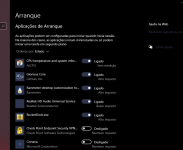
Probably not BT, what you have on the startup? Some program its delaying the shutdown, some time ago I have a similar problem rainmeter delay the shutdown of the laptop. Its probably one program that is causing a delay, can be anything even a program to control RGB from a mouse or keyboard.
You can remove every program of startup, when boot to windows, don't start anything, shutdown and see if the behavior disappear.
Last edited by a moderator:
Upvote
0
Recently browsing
Members who viewed this thread in the last 5 minutes
You may also like...
-
 Troubleshooting Dell PC Does not power on
 -

-
M
- Opera
- Maciej Kocemba
- · 0
-
 Setup Idea Pretty Good PC Security Regimen
 -
