

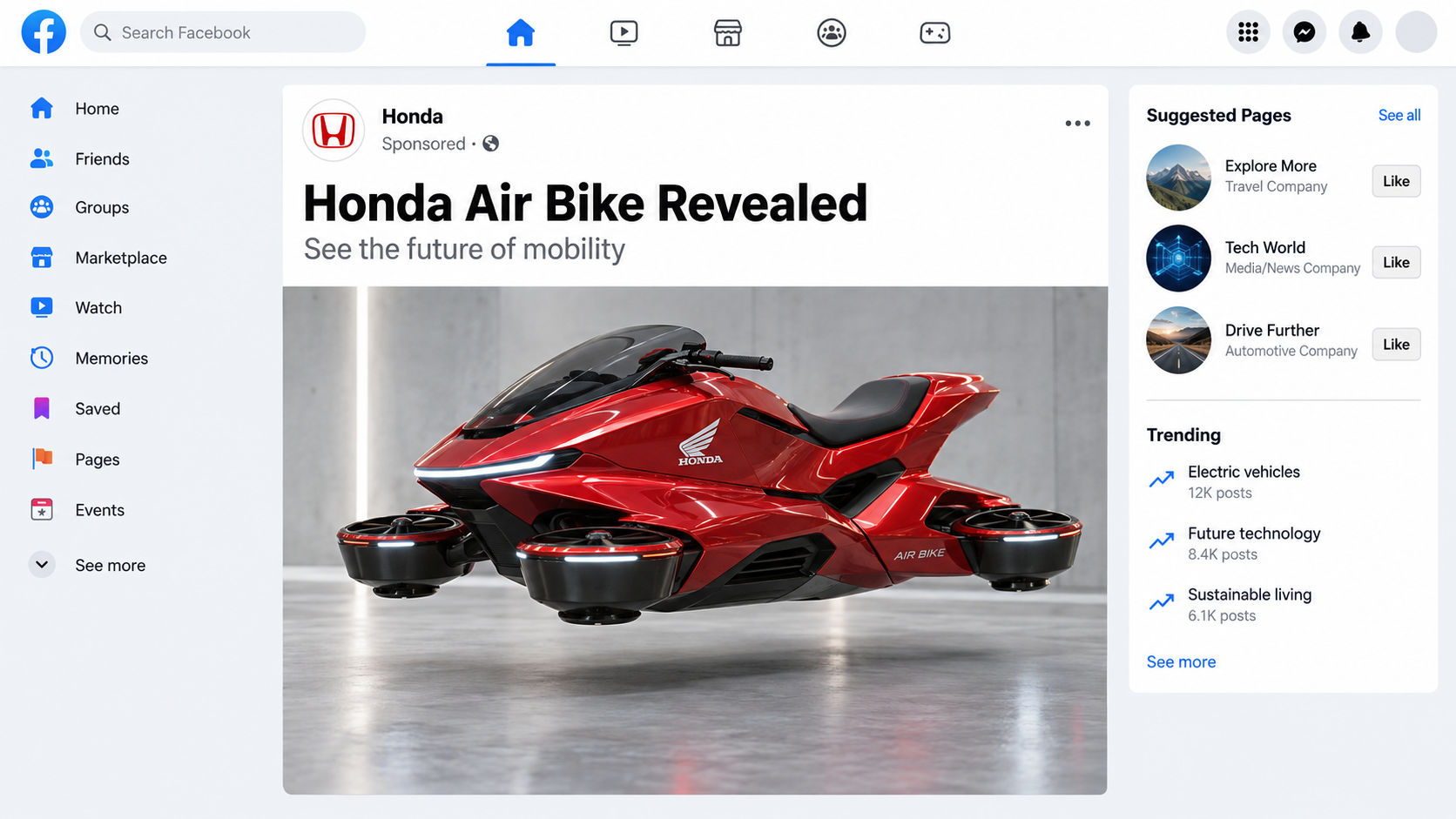
A sleek Honda motorcycle rises above traffic, glides through a showroom, and appears to turn science fiction into tomorrow’s commute.
The clips are polished enough to invite belief. A closer examination tells a more grounded and useful story.
Overview
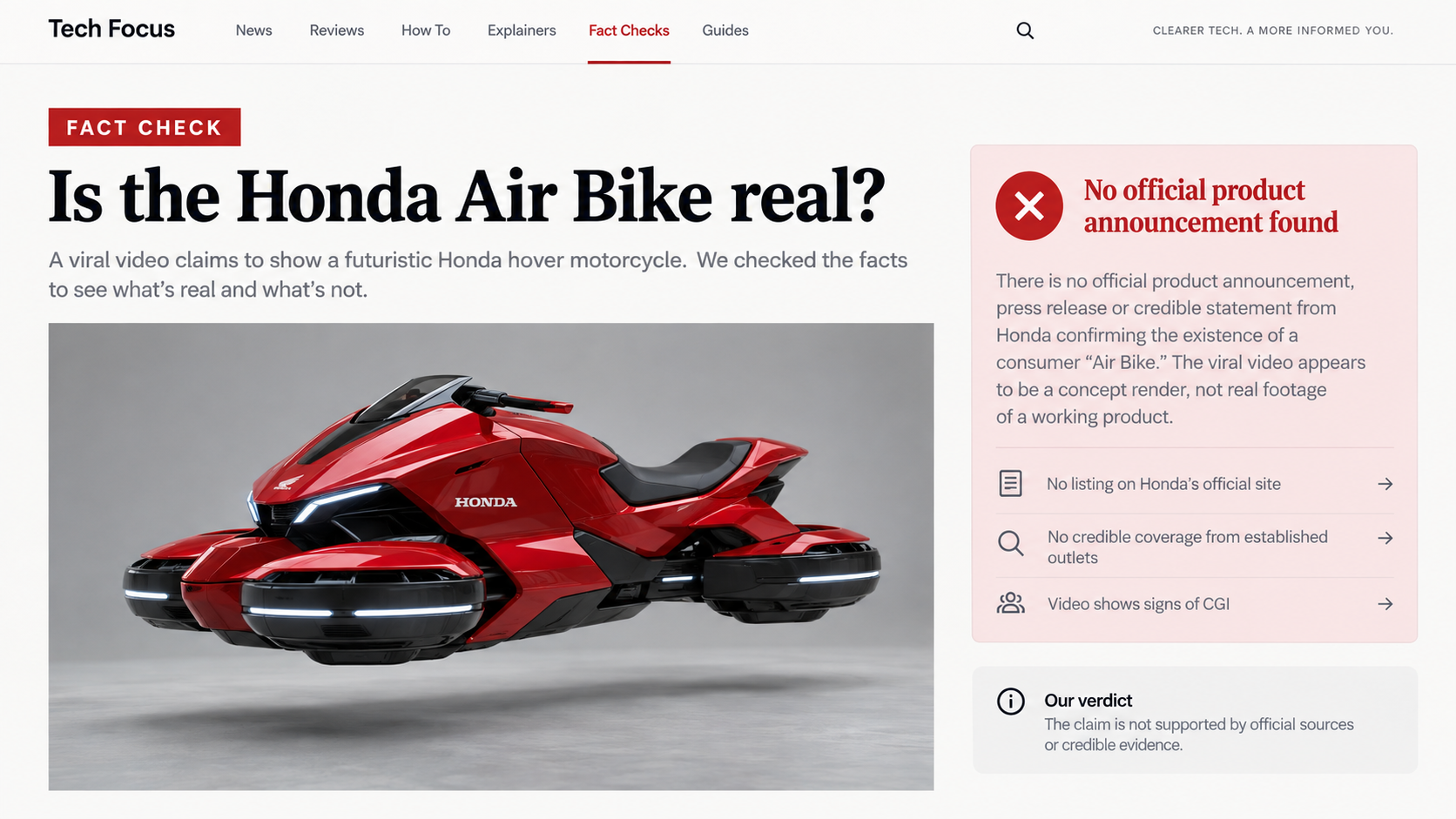
The Honda New Air Bike is not an announced Honda product
We found no matching motorcycle in Honda’s official newsroom, product catalog, technology releases, or major mobility announcements.
Honda does explore electric motorcycles, advanced mobility, robotics, aircraft, and futuristic concepts. That real innovation makes the fabricated Air Bike story feel plausible.
The viral material borrows that reputation while providing no model page, engineering specification, homologation record, launch event, or authorized dealer information.
The videos behave like synthetic concept content
Different clips show shifting shapes, impossible controls, inconsistent wheels, floating movement, and showroom details that do not remain stable.
Those clues are consistent with AI-generated video or computer animation. They are not consistent with documentation of one physical prototype.
A real demonstration would show continuous operation, named engineers, independent camera angles, safety boundaries, and repeatable technical details.
The hoax can become dangerous when a payment link appears
Some viewers treat the clips as harmless futuristic entertainment. Others ask where to reserve the motorcycle, creating an opening for impersonation.
A scammer can attach a fake preorder form, dealer deposit, shipping fee, investment pitch, or cryptocurrency wallet to the viral claim.
Key findings from our review include:
- No official Honda announcement matches the “New Air Bike” name.
- The visual design changes between popular clips and still images.
- No credible performance or safety documentation accompanies the posts.
- Real Honda concept vehicles are documented through official channels.
- Any reservation link deserves immediate independent verification.
What the Viral Honda Air Bike Videos Claim
Posts describe a motorcycle that can hover, fly above traffic, or transition between road travel and airborne movement.
Some versions use phrases such as magnetic levitation, silent propulsion, anti-gravity stabilization, or next-generation electric mobility.
These scientific-sounding labels are rarely accompanied by energy requirements, thrust figures, flight controls, operating limits, or regulatory classification.
The design changes from one post to another
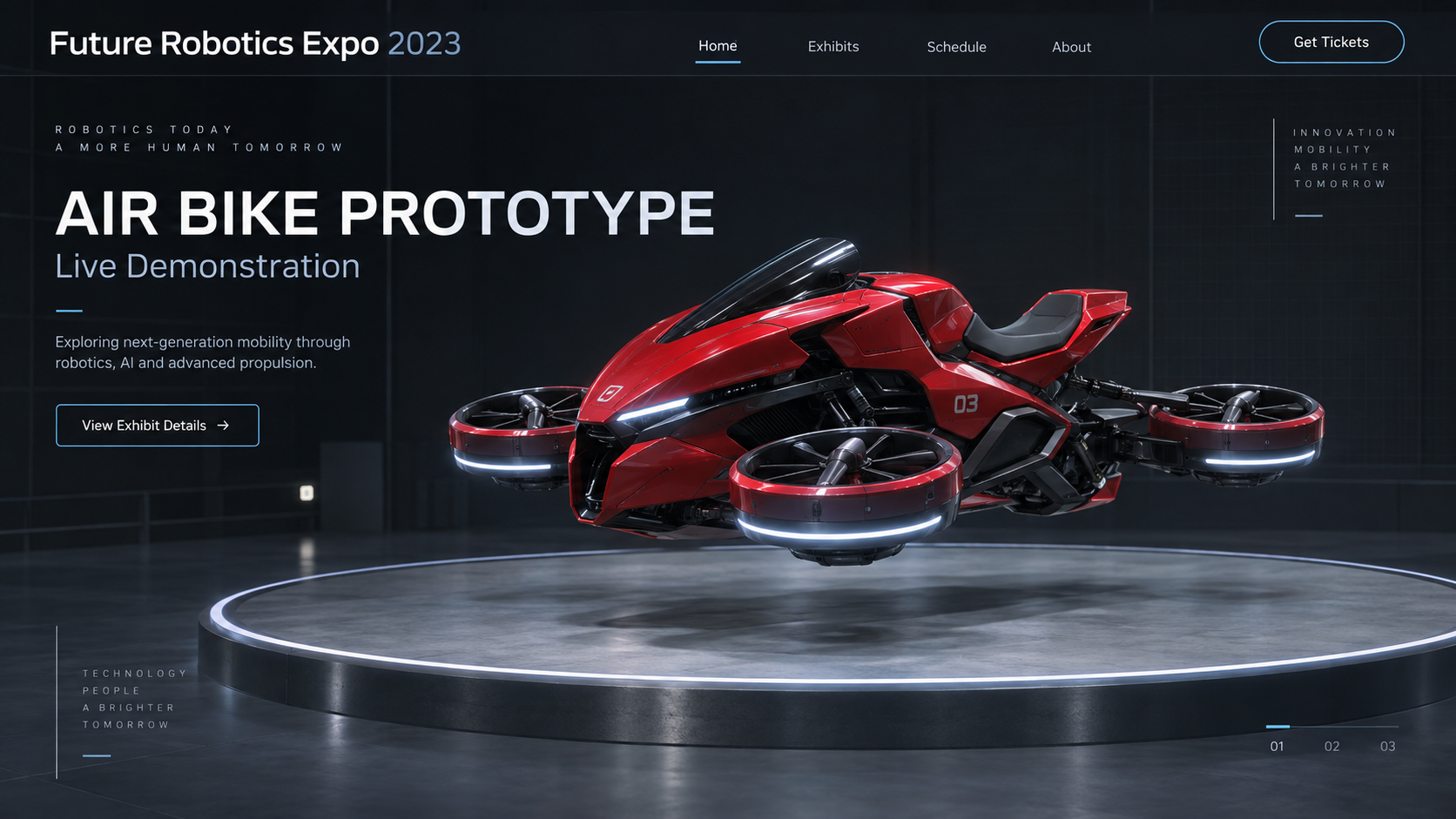
One version resembles a conventional sport motorcycle. Another has enclosed wheels, turbine openings, wings, or glowing rings.
Brand markings drift across body panels. Seats, handlebars, suspension parts, and display screens can change within a short sequence.
That visual instability strongly suggests multiple generated concepts being grouped under one invented name.
Showroom scenes imitate product-launch language
Bright stages, corporate colors, crowds, and polished signage make a clip resemble footage from a technology exhibition.
Yet the supposed event is often unnamed. There is no agenda, press kit, venue confirmation, or complete presentation from a recognized source.
Short video hides weaknesses. Fast cuts prevent viewers from checking whether the machine remains mechanically consistent.
Technical phrases replace testable specifications
“Air drive” and “quantum propulsion” can sound impressive without describing a working system. Genuine engineering announcements provide measurable constraints.
A flying motorcycle must address lift, stability, power density, noise, redundancy, pilot training, emergency landing, and public-airspace rules.
The viral Air Bike posts provide spectacle instead. The missing limitations are as revealing as the dramatic claims.
How the Honda Air Bike Hoax Works
Step 1: A familiar brand supplies instant credibility
Honda is associated with motorcycles, engines, engineering, and long-term research. Viewers already believe the company could reveal unusual transportation technology.
The hoax does not need to build trust from nothing. It attaches an extraordinary claim to decades of legitimate brand recognition.
Logos, red-and-white graphics, showroom banners, and model badges are easy to generate. Their presence does not prove company involvement.
Step 2: A short synthetic clip delivers the impossible moment
The most shareable scene lasts only seconds. A machine lifts, turns, or floats while dramatic music implies a breakthrough.
Video generation is especially effective here because viewers expect motion blur, camera movement, reflections, and rapidly changing backgrounds.
Errors disappear before the eye can settle. Replaying frame by frame often reveals morphing components and inconsistent geometry.
Step 3: Captions present speculation as recent news
A caption may say Honda “finally unveiled” the Air Bike or that testing has “shocked the automotive world.”
No date, spokesperson, location, or release link follows. The confident sentence substitutes for the evidence a genuine announcement would provide.
Words such as “concept,” “rumor,” and “fan-made” may be omitted because certainty attracts more engagement.
Step 4: Reposts erase the original context
A synthetic-art creator may initially post an imaginative concept. Aggregators then download, crop, relabel, and upload it as factual footage.
After several generations, watermarks disappear and the caption becomes more dramatic. Viewers encounter the claim without its original explanation.
Large view counts then function as false confirmation. Popularity shows distribution, not authenticity.
Step 5: Engagement comments amplify the false claim
People tag friends, debate the price, and ask when sales begin. Every reaction helps the platform recommend the post more widely.
Accounts may answer with invented release dates or prices. Other users repeat those guesses until they resemble established details.
Comments expressing doubt can also increase reach. Verify before interacting when a post appears designed mainly to provoke.
Step 6: Impersonators add a reservation or investment offer
The most harmful stage begins when someone offers early access. A fake dealer page can request a refundable deposit or identity documents.
Another version may promote shares, tokens, or crowdfunding supposedly connected to the technology. Honda branding is used without authorization.
Money sent through cryptocurrency, wire transfer, gift card, or peer-to-peer payment can be difficult to recover.
Step 7: The same visual returns under a new model name
When fact-checks catch up, promoters can rename the vehicle, change the year, or claim a secret launch in another country.
The underlying footage remains useful because most viewers see it for the first time. Search results may not connect the new wording with earlier debunks.
Verify the manufacturer, not the story’s chosen model name. Official product records are harder to rotate than social captions.
How to Check a Futuristic Vehicle Claim
You do not need aerospace expertise to verify whether a major manufacturer announced a vehicle. Start with the publication trail.
Search the official global newsroom
A major product reveal creates press releases, specifications, photographs, executive statements, and regional launch details.
Search Honda’s official newsroom directly. Do not rely on a social post linking to a page with Honda in the domain path.
Check the domain carefully. A genuine-looking page hosted on a free blog, unfamiliar store, or misspelled address is not an official source.
Look for independent continuous footage
A working airborne vehicle would attract extensive reporting. Expect long demonstrations from several reputable outlets, not only repeated vertical clips.
Continuous footage should show takeoff, control, landing, charging or fueling, safety procedures, and people interacting naturally with the machine.
If every post uses the same seconds from the same angle, the evidence is weak regardless of view count.
Compare fixed mechanical details
Pause at several points and compare wheel openings, brake discs, footrests, cables, handlebars, mirrors, logos, and panel seams.
Physical components should remain attached and geometrically stable. Generated video often redraws them as the camera or object moves.
Also watch reflections. A glossy surface should reflect the same room and lighting seen around the motorcycle.
Ask what rules would apply
A road motorcycle and an aircraft face different licensing, certification, insurance, and operating requirements.
A credible launch explains the category and limitations. Claims of immediate unrestricted flight over traffic ignore major safety and regulatory barriers.
Regulation does not make innovation impossible. It makes a secret consumer rollout far less believable.
Real Honda Concepts Are Documented Differently
Honda has displayed futuristic mobility concepts, including electric motorcycles and experimental personal mobility devices. Those projects are not hidden behind anonymous viral pages.
Official concept announcements identify the event, design purpose, technology direction, and development status. They separate exploration from a product available for purchase.
That distinction protects both excitement and accuracy. A concept can be real even when it has no price or production date.
The Air Bike hoax reverses that pattern. It presents a visual first, then lets viewers invent the engineering, launch status, and commercial availability.
Why the Physics Claims Need More Than a Video
Any craft that lifts a rider must push against air, eject mass, or interact with an external system. A glowing ring is not an explanation.
Lift requires substantial continuous power. Batteries must supply that energy while remaining light enough for the complete vehicle to rise.
Even genuine electric aircraft devote enormous attention to battery weight, motor redundancy, cooling, and emergency reserves.
A motorcycle-sized machine has little room for rotors, shielding, landing systems, and a battery large enough for useful range.
Visible downward airflow would disturb dust, clothing, loose objects, and nearby vegetation. Many viral scenes show none of those effects.
Noise also matters. Moving enough air to lift a person and machine is not normally silent, regardless of electric propulsion.
Magnetic levitation requires a compatible track or field infrastructure. It does not allow free flight over ordinary roads by itself.
Words such as anti-gravity provide no testable mechanism. Extraordinary propulsion requires public evidence stronger than a smoothly animated clip.
Control is another challenge. A flying vehicle must correct pitch, roll, yaw, wind gusts, and shifting rider weight rapidly.
Real prototypes often look less elegant because sensors, guards, landing gear, and redundant systems remain visible during testing.
The viral Air Bike looks finished before any development trail appears. That reversal is a classic sign of concept imagery.
A manufacturer could keep research confidential, but a consumer launch cannot remain secret while accepting public orders.
Certification documents, test locations, suppliers, patents, and engineering staff usually leave a broad trace once a product approaches sale.
We do not rely on the absence of one record. We rely on the combined absence of an official announcement and coherent technical evidence.
How AI Video Mistakes Reveal Themselves
Generated video improves quickly, so old checklists age badly. Viewers should examine consistency across time rather than hunt for one strange frame.
Follow a fixed component through the clip. A brake rotor, footrest, logo, or vent should retain the same shape and position.
Watch how the tires meet the ground before takeoff. Contact shadows should change gradually, not blink or slide independently.
Read every sign in several frames. Synthetic text can become different letters as the camera moves or another object passes.
Check spectators and reflections. People may merge, repeat movements, or face events that do not appear in mirrored surfaces.
Audio is not proof either. A realistic presenter voice, engine sound, and crowd reaction can all be generated or added later.
The best verification remains provenance. Find the earliest upload, identify its creator, and locate an official manufacturer version.
Company, Address, and Fulfillment Checks
Confirm the seller is an authorized Honda channel
A Honda logo does not create authorization. Find the dealer through Honda’s official regional locator and contact it using independently obtained details.
Do not use the phone number or chat link embedded in a viral reservation page until its ownership is confirmed.
Verify the event and business address
Fake launch pages may name a convention center, technology expo, or dealership. Search the venue’s official schedule and exhibitor list.
Map any seller address. Virtual offices, unrelated homes, empty lots, and copied dealership addresses cannot support a vehicle delivery promise.
Reject unusual deposit instructions
Legitimate vehicle reservations provide a written agreement, cancellation terms, tax treatment, and traceable merchant identity.
A request for cryptocurrency, gift cards, wire transfer, or payment to an individual is a severe warning sign.
Check the fulfillment claim against reality
A flight-capable vehicle cannot arrive like an ordinary accessory. Delivery would involve registration, documentation, training, and jurisdiction-specific compliance.
Promises of worldwide doorstep shipping with no licensing discussion show that the seller is avoiding the hardest part of the claim.
Ask for the complete legal agreement before sending identification. A genuine reservation should identify the manufacturer, dealer, refundable amount, and governing jurisdiction.
Call the verified regional Honda office and describe the offer. Do not accept confirmation from a representative reachable only through the suspect page.
If promoters claim secrecy, remember that consumer delivery requires public infrastructure. Insurance, regulators, dealers, and service technicians cannot all remain invisible.
What to Do if You Shared or Paid Through an Air Bike Ad
- Stop communicating through the advertisement. Record the page URL, account name, payment instructions, messages, and transaction identifiers first.
- Contact the payment provider immediately. Explain that the seller impersonated a manufacturer or offered a nonexistent product.
- Ask the bank to protect future charges. Replacing a card may not stop every tokenized or recurring merchant authorization.
- Secure exposed accounts. Change reused passwords, enable multifactor authentication, and review email forwarding and recovery settings.
- Protect identity documents. If you uploaded identification, contact appropriate identity-theft services and monitor credit activity.
- Report the impersonating page. Use the platform’s fraud and trademark categories. Include the official Honda page showing no matching offer.
- Report financial fraud. Notify the relevant national consumer protection or cybercrime authority with your preserved evidence.
- Scan any downloaded files. Run Malwarebytes if the page supplied a brochure, wallet, app, extension, or supposed reservation software.
- Block the advertising chain. AdGuard can reduce malicious redirects and repeated scam ads, although it cannot authenticate future vehicle announcements.
- Warn contacts carefully. Share the fake page address and verification method, not the sensational clip alone, which can spread the hoax further.
Is Your Device Infected? Run a Free Malware Scan
Slow performance, constant pop-ups, or strange behavior? These are classic signs of a malware infection. The fastest way to find out is to scan your device with Malwarebytes Free — one of the most trusted malware removal tools available.
The free version detects and removes the most common threats, including:
- Adware — the cause of those annoying pop-ups
- Browser hijackers — unwanted redirects and changed homepages
- Trojans and spyware — hidden programs stealing your data
- Potentially unwanted programs (PUPs) — software you never asked for
👉 Select your device below — Windows, Mac, or Android — then follow the simple steps to download Malwarebytes, scan your system, and remove any threats it finds. The scan usually takes 5 to 20 minutes.
Run a Malware Scan with Malwarebytes for Windows
Malwarebytes is one of the most popular and trusted anti-malware tools for Windows — and it’s completely free for removing infections. It catches threats that many antivirus programs miss, including adware, browser hijackers, and trojans. Follow the steps below to scan and clean your PC in just a few minutes.
Download Malwarebytes
Click the button below to download the latest version of Malwarebytes for Windows from the official source. The free version is all you need — it will scan your computer and remove adware, browser hijackers, and other malicious software at no cost.
Download MalwarebytesOfficial installer for Windows 11 and 10. Your download starts right away.Want real-time protection? See Malwarebytes Premium Malwarebytes Free for WindowsScans and removes malware at no cost
-
Install Malwarebytes
When the download finishes, open your Downloads folder and double-click the MBSetup file. If Windows shows a User Account Control pop-up, click “Yes” to allow the installation.

Follow the On-Screen Prompts to Install Malwarebytes
The setup wizard will walk you through a few quick screens:
-
Choose where you’re installing the program — “Personal Computer” or “Work Computer” — then click Next.

-
Malwarebytes will now install on your device. This usually takes under a minute.

-
When installation is complete, the “Welcome to Malwarebytes” screen will open automatically.

-
On the final screen, click Open Malwarebytes to launch the program.

-
Enable “Scan for Rootkits”
Before scanning, turn on rootkit detection so Malwarebytes can find even the most hidden threats. Click the Settings gear icon on the left side of the screen.

In the settings menu, find “Scan for rootkits” and click the toggle so it turns blue.

Done? Click “Dashboard” in the left pane to return to the main screen.
Start the Scan
Click the blue Scan button. Malwarebytes will automatically update its virus database and start checking your computer for malware.

-
Wait for the Scan to Finish
The scan checks your entire system for browser hijackers and other malicious programs, so it can take 5 to 20 minutes depending on your computer. Feel free to do something else — just check back occasionally to see the progress.

-
Quarantine the Detected Threats
When the scan is done, you’ll see a list of everything Malwarebytes found — malware, adware, and potentially unwanted programs. Click the “Quarantine” button to remove all of them at once.

Malwarebytes will now remove the malicious files and registry entries and move them safely into quarantine.

-
Restart Your Computer
Some threats can only be fully removed after a reboot. If Malwarebytes asks you to restart, click Yes. Once you’re logged back in, Malwarebytes has finished removing the threats it found.

That’s it — your Windows PC is now clean of trojans, adware, and other malware, and should be back to running smoothly.
If you are still having problems with your computer after completing these instructions, then please follow one of the steps:
- Run a computer scan with ESET Online Scanner
- Ask for help in our Windows Malware Removal Help & Support forum.
Run a Malware Scan with Malwarebytes for Mac
Malwarebytes for Mac is a free on-demand scanner that removes the malware other security software tends to miss — adware, browser hijackers, and unwanted programs included. Cleaning an infected Mac with Malwarebytes has always been completely free, and it’s our go-to recommendation. Follow the steps below to scan and clean your Mac in just a few minutes.
-
Download Malwarebytes for Mac
Click the button below to download the latest version of Malwarebytes for Mac.
Download MalwarebytesOfficial installer for macOS. Your download starts right away.Want real-time protection? See Malwarebytes PremiumMalwarebytes Free for MacScans and removes malware at no cost -
Open the Malwarebytes setup file
When the download finishes, open your Downloads folder and double-click the setup file to begin the installation.

-
Follow the On-Screen Prompts to Install Malwarebytes
The Malwarebytes for Mac Installer will guide you through a few quick screens. Click “Continue” and keep following the prompts until the installation completes.



When the installation is complete, Malwarebytes opens to the Welcome to Malwarebytes screen. Click “Get started“.
-
Select “Personal Computer” or “Work Computer”
Malwarebytes will ask what type of computer you’re installing it on. Click either Personal Computer or Work Computer, whichever applies.

-
Start the Scan
Click the “Scan” button. Malwarebytes will automatically update its detection database and begin checking your Mac for malware.

-
Wait for the Scan to Finish
Malwarebytes will scan your Mac for adware, browser hijackers, and other malicious programs. This can take a few minutes, so feel free to do something else — just check back occasionally to see the progress.

-
Quarantine the Detected Threats
When the scan is done, you’ll see a list of everything Malwarebytes found. Click the “Quarantine” button to remove all the threats at once.

-
Restart Your Mac
Malwarebytes will now remove all the malicious files it found. Some threats can only be fully removed after a reboot — if Malwarebytes asks you to restart, allow it. Once you’re logged back in, your Mac is clean.

That’s it — your Mac is now free of adware, rogue browser extensions, and other potentially harmful software.
If you are still experiencing problems while trying to remove a malicious program from your computer, please ask for help in our Mac Malware Removal Help & Support forum.
Run a Malware Scan with Malwarebytes for Android
Malwarebytes for Android automatically detects and removes dangerous threats like malware and ransomware so you don’t have to worry about your most-used device being compromised. Aggressive detection of adware and potentially unwanted programs keeps your Android phone or tablet running smooth.
-
Download Malwarebytes for Android.
You can download Malwarebytes for Android by clicking the link below.
Get Malwarebytes for AndroidOpens Google Play in a new tab.Want real-time protection? See Malwarebytes Premium for AndroidMalwarebytes for AndroidScans your phone and removes malware at no cost -
Install Malwarebytes for Android on your phone.
In the Google Play Store, tap “Install” to install Malwarebytes for Android on your device.

When the installation process has finished, tap “Open” to begin using Malwarebytes for Android. You can also open Malwarebytes by tapping on its icon in your phone menu or home screen.

-
Follow the on-screen prompts to complete the setup process
When Malwarebytes will open, you will see the Malwarebytes Setup Wizard which will guide you through a series of permissions and other setup options.
This is the first of two screens that explain the difference between the Premium and Free versions. Swipe this screen to continue.
Tap on “Got it” to proceed to the next step.
Malwarebytes for Android will now ask for a set of permissions that are required to scan your device and protect it from malware. Tap on “Give permission” to continue.
Tap on “Allow” to permit Malwarebytes to access the files on your phone.
-
Update database and run a scan with Malwarebytes for Android
You will now be prompted to update the Malwarebytes database and run a full system scan.

Click on “Update database” to update the Malwarebytes for Android definitions to the latest version, then click on “Run full scan” to perform a system scan.

-
Wait for the Malwarebytes scan to complete.
Malwarebytes will now start scanning your phone for adware and other malicious apps. This process can take a few minutes, so we suggest you do something else and periodically check on the status of the scan to see when it is finished.

-
Click on “Remove Selected”.
When the scan has been completed, you will be presented with a screen showing the malware infections that Malwarebytes for Android has detected. To remove the malicious apps that Malwarebytes has found, tap on the “Remove Selected” button.

-
Restart your phone.
Malwarebytes for Android will now remove all the malicious apps that it has found. To complete the malware removal process, Malwarebytes may ask you to restart your device.
That’s it — your Android phone is now clean — no more malicious apps, adware, or browser redirects.
If you are still having problems with your phone after completing these instructions, then please follow one of the steps:
- Restore your phone to factory settings by going to Settings > General management > Reset > Factory data reset.
- Ask for help in our Mobile Malware Removal Help & Support forum.
Stay Protected: Block Ads and Malicious Sites
Now that your device is clean, keep it that way. Most infections start with a malicious ad or a fake download button — so blocking them at the source is your best defense.
We recommend AdGuard, which blocks malicious ads, phishing pages, and dangerous redirects before they can reach you.
👉 Download AdGuard and browse safely
Frequently Asked Questions
Is the Honda New Air Bike real?
We found no official Honda product announcement matching the viral vehicle. The circulating visuals show strong signs of synthetic or computer-generated production.
Did Honda unveil a flying motorcycle?
Honda develops advanced mobility concepts, but that does not validate the Air Bike clips. No matching official reveal accompanied these posts.
Are the videos definitely made with AI?
The inconsistencies strongly support AI generation or CGI. Without original project files, we cannot assign one exact production tool to every clip.
Can I preorder the Honda Air Bike?
No verified preorder program was found. Treat any deposit request as dangerous until Honda confirms it through an official regional website.
Why do fake vehicle videos look convincing?
Short clips combine realistic lighting, familiar logos, fast movement, and showroom imagery. Viewers have little time to notice changing mechanical details.
Could Honda build something similar in the future?
Future engineering is always possible, but possibility does not authenticate today’s video. Evaluate a product only through documented, current evidence.
The Bottom Line
The Honda New Air Bike is a viral visual story, not a documented motorcycle launch. Real branding and real Honda innovation are being used as credibility shortcuts.
Enjoy futuristic concepts as imagination, but never send money or documents until the manufacturer confirms the model, seller, specifications, and reservation process.

Join the discussion
0 commentsShare your experience or ask a question about this article.
Discussion
Start the conversation
Have a question or something useful to share? Add the first comment.