

The MalwareTips app
Your community, one tap away.
Open MalwareTips from your Home Screen or desktop. Follow discussions, find answers and pick up where you left off.
- Home Screen access
- Optional push alerts
- Your community
You're ready to explore.Explore what's new
Installation instructions
iPhone & iPad
- Open MalwareTips in Safari and tap Share. You may need to open the Page Menu first.
- Choose Add to Home Screen. If it is not listed, use Edit Actions to add it.
- Keep Open as Web App enabled if shown, then tap Add.
Android
- Open MalwareTips in Chrome or another browser that supports app installation.
- Open the browser menu and look for Install app, Install and create shortcut, or Add to Home screen.
- Choose Install and confirm. Wording varies by browser.
Desktop
- Chrome: use the install icon in the address bar, or the menu under Cast, save and share.
- Edge: open the menu, then More tools, Apps and Install this site as an app.
- Safari on Mac: choose Share or File, then Add to Dock. Firefox on Windows: look for the web apps button in the address bar.
If you cannot find an install option, update your browser or use its bookmark option to keep MalwareTips close.
Keep up with your conversations
After installation, open the app and sign in. Enable push notifications in Preferences if you want alerts. On iPhone and iPad, push requires a Home Screen web app and iOS or iPadOS 16.4 or later.
Sign in to manage notificationsInstallation is optional. Your notification settings stay under your control.
You are using an out of date browser. It may not display this or other websites correctly.
You should upgrade or use an alternative browser.
You should upgrade or use an alternative browser.
Planned software upgrade - Feedback
- Thread starter Jack
- Start date
Announcements
446 Replies
127,383 Views
- Status
- Not open for further replies.


Personally, I like the new look, I often apply the concept of resilience, the power of adapting to change and transform uncertainties into opportunities, and risks in the possibility of growth. Where sustainability aims to keep the world in balance, resilience helps to find solutions in a world that is often unbalanced
BTW a forum like MT can be considered like an extension of our life.
Just my opinion
BTW a forum like MT can be considered like an extension of our life.
Just my opinion

With the new design, I now have to actually click on the bell icon too see any notifications I have, which is annoying.
Notifications/alerts themself does work automatic but it's from who and where that should be easier to check. It should be possible to implement again with the mouse pointer hoover and automatic popup feature on those icons. I belive @Jack will fix it as soon he's got the time.
The new Tab notification/alert feature should IMO be possible for members to toggle off or on as the " Bell " icon notification in the top right corner works fine on every page.

In the " Currently Online " status sidebar window banned members shouldn't be viewble. Atleast not for normal members IMO.
One more thing. The automatic Save drafts in the editor is much better now.

Last edited:
Not for me. I need to click on the notification icon to see my alerts. Even hovering my mouse pointer over it does nothing.Notifications/alerts themself does work automatic
Have you checked your " Alert preferences "? Click on the Bell icon then a bit down on the popup window where it says " Preferences ". Scroll down and check if " Receive an alert when someone… " is enabled.Not for me. I need to click on the notification icon to see my alerts.
Yes and everything is checked.Have you checked your " Alert preferences "?

Setup PCPC setup

Would be great if Security related threads (like as Malware HUB ones, Malware Alerts,...) could get a red badge as previous?
Don't know whether it's related to the Midnight Design, however, all badges are blue and therefore hard to distinguish.
I know, I might be to picky
Don't know whether it's related to the Midnight Design, however, all badges are blue and therefore hard to distinguish.
I know, I might be to picky

@Spawn is working on the new Label, so it's a work in progress.Would be great if Security related threads (like as Malware HUB ones, Malware Alerts,...) could get a red badge as previous?
Don't know whether it's related to the Midnight Design, however, all badges are blue and therefore hard to distinguish.
I know, I might be to picky
Also same problem here, need to click to see alerts.
same problem like @roger_m ...i must click to open the alerts...that's not so comfortable
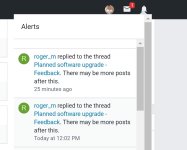
I don't understand the issue, so when you receive an alert, the Bell in the header should get a red badge with a number ("1" in this case), then you click on the Bell and the alert shows in a sub-menu. Wasn't always like this?Not for me. I need to click on the notification icon to see my alerts. Even hovering my mouse pointer over it does nothing.
Looking forward to!@Spawn is working on the new Label, so it's a work in progress.
I don't understand the issue, so when you receive and alert, the Bell in the header should get a red badge with a number ("1" in this case), then you click on the Bell and the alert shows in a sub-menu. Wasn't always like this?
It's great to see this place evolve so fast!
I didn't know that. Thanks. I've always clicked on the BellIn the previous version, if you hover above the Bell the alerts became visible. To click is no problem for me.
I'll see what can be done to bring that back.
As a separate note I've increased the max-width of the theme to 1330px, so it should be more space. And also we've moved the Most Posts (last 30 days) box, under the quick reply box.
PS. @frogboy & @Evjl's Rain are just 2 posts away.. I'm waiting to see if @Evjl's Rain will take the lead. : P
I'm not getting any alerts,until I manually click on the Bell icon. Until I click on the bell, no alerts are shown.I don't understand the issue, so when you receive an alert, the Bell in the header should get a red badge with a number ("1" in this case), then you click on the Bell and the alert shows in a sub-menu. Wasn't always like this?
So you don't see this type of alert - red box with number - when you have a new notification??I'm not getting any alerts,until I manually click on the Bell icon. Until I click on the bell, no alerts are shown.
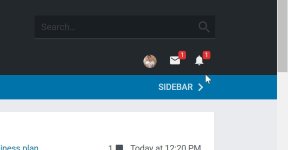
No, not since the update.So you don't see this type of alert - red box with number - when you have a new notification??

Sounds like a challenge to me.I didn't know that. Thanks. I've always clicked on the Bell
I'll see what can be done to bring that back.
As a separate note I've increased the max-width of the theme to 1330px, so it should be more space. And also we've moved the Most Posts (last 30 days) box, under the quick reply box.
PS. @frogboy & @Evjl's Rain are just 2 posts away.. I'm waiting to see if @Evjl's Rain will take the lead. : P
- Status
- Not open for further replies.
Recently browsing
Members who viewed this thread in the last 5 minutes


