Planned software upgrade - Feedback

Announcements
446 Replies 127,371 Views
Status
Not open for further replies.
I cannot reproduce any of these issues. I've installed both browsers, however both work as they should... Are you guys running any extension that might block these elements?
View attachment 185831View attachment 185832
@Jack. I've disabled all the extensions and it's still the same. I can not write and ask for confirmation for a. I like ... I will continue investigating.
Screenshot_2.png

The only convincing reason is that I'm using Windows XP. because the other PC I think has passed to a better life.
 
Last edited:
In inspect (from right-click), on Iron version 49.0.2600.0 , I see in green:
"<!--[if lt IE 9]><div class="blockMessage blockMessage&#45;&#45;important blockMessage&#45;&#45;iconic">You are using an out of date browser. It may not display this or other websites correctly.<br />You should upgrade or use an <a href="Chrome for Desktop" target="_blank">alternative browser</a>.</div><![endif]-->"

<form action="/threads/planned-software-upgrade-feedback.81369/add-reply" method="post" class="block js-quickReply" data-xf-init="attachment-manager quick-reply ajax-submit draft" data-draft-url="/threads/planned-software-upgrade-feedback.81369/draft" data-draft-autosave="60" data-message-container=".js-replyNewMessageContainer" data-preview-url="/threads/planned-software-upgrade-feedback.81369/reply-preview?quick_reply=1">
... ...

- in div.message.message.quickReply.block and div.block - body and div.block - container...
I see too--> : : after in red, it's div.message - cell.message - cell - - main : : after 0px x 0px

In "Content-Aware Ad Blocker" extension, on Iron, I see content flagged in red (so blocked): https://malwaretips.com/js/xf/notice.min.js?_v=fefa26ba - but no change if I unblock this fefa notice, so: no possibility to write, ATTACH FILES and POST REPLY links only.

- what you would like to see?

PS. Thank you for B bold - it is OK now, works! bolding the highlighted text. In Firefox ESR 52.7.3.
 
Last edited:
i dont know how to explain, when making a post, and i put a new image inbetween items(text, pics) it will jump down too much.

Not sure I seen that specific but I have noted a few times that the cursor ended up a line or two down where it shouldn't and along with some other previously odd behavior I have no doubt that the Editor has a few bugs/glitches. I'm pretty sure similar things is or have been reported on XenForos support forum.
 
Last edited:
I don't have problems on Firefox (ESR) and Firefox forks (Nightly/Basilisk). Too no problems on Slimjet.

- problems only on some Chrome forks: Iron, Cent, Opera 36: in Post Reply container: no possibility to write, ATTACH FILES and POST REPLY links only.
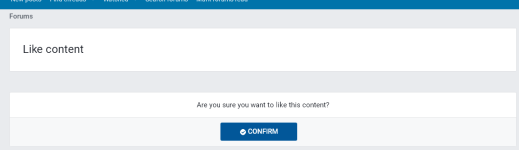
And Like and Unlike prompts to confirm.
Unlike on Iron link: https://malwaretips.com/posts/725772/like - yes if you're not Prorootect, you doesn't see the CONFIRM page, ...:)

Bolding doesn't work on Firefox ESR now.
 
Last edited:
FOUND!

I've found the source of "no possible to write in post reply container" problem! And EDIT post - no content problem! And "like/unlike CONFIRM" page problem!

It's ScriptSafe extension.

If disabled ScriptSafe - I don't have this problems, instantly, on Iron...

And Bolding on Iron works now!
- I've posted this post from Iron...(y)

PS. Bolding text doesn't work now...
 
Last edited:
FOUND!

I've found the source of "no possible to write in post reply container" problem! And EDIT post - no content problem!

It's ScriptSafe extension.

If disabled ScriptSafe - I don't have this problem, instantly, on Iron...

And Bolding on Iron works now!
- I've posted this post from Iron...(y)

PS. Bolding text doesn't work now...
Nice find, it seems to have worked for me also. Cheers for that solution. (y)
 
Yes: Jack said first:
"I cannot reproduce any of these issues. I've installed both browsers, however both work as they should... Are you guys running any extension that might block these elements?"

So listen to our Jack, please, he has the big ability to premonition!

So with my magic wand, all problems are gone (in Iron and Slimjet).
I am glad about this, and now the question arises: why with previous forum software had not these problems, and with new forum software they appeared?
(- and bolding doesn't work in Chromium forks...).

The situation here now is mixed:

Iron and Slimjet are working good (with ScriptSafe disabled).
(...I've tried to change the settings in ScriptSafe, but no results, so disabled it for now...)

But Cent (version 1.8.9.28 (portable)) - don't work, all these problems persist, yet I tried quite a bit: disabled all extensions (like @bribon77), first ScriptSafe and other script blockers, restarted the page every time, cleared browsing data, changed many settings in Cent Settings...but no results: always this same problems, sadly.
So I haven't found, for the moment, the cause of the problems with new MT forum software in Cent browser...but I want to search again...

Posted this reply in Iron...
 
Status
Not open for further replies.

Recently browsing

Members who viewed this thread in the last 5 minutes

Back
Top